WireGuard is configured in LANconfig under .
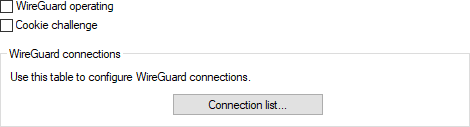
- WireGuard operating
- Enables or disables the WireGuard function on the device.
- Cookie challenge
- The cookie challenge is a protection mechanism against CPU exhaustion attacks during the handshake process. The computation of the Diffie-Hellman (DH) function during the WireGuard handshake is inherently CPU-intensive. An attacker could attempt to overload the router by sending a large number of handshake requests to crash it or severely impact its performance (CPU exhaustion attack). This mechanism forces the attacker to perform an additional network round trip and respond to the cookie for each handshake attempt. This significantly increases the cost of the attack, making it much less effective, while allowing the server to limit the number of DH computations it must perform, thus protecting its resources. When the cookie challenge is enabled, the device always sends a cookie-reply message during the handshake.
- Connection list
-
This section defines the WireGuard connections.
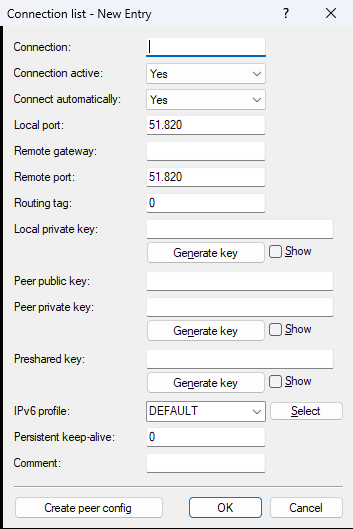
- Connection
- Name of the WireGuard connection or WireGuard peer.
- Connection active
- Enables or disables this connection.
- Connect automatically
- Defines whether the WireGuard tunnel should be established automatically—e.g., after the device starts or after the WAN connection has been established—or only when actual user data is being transmitted. This switch must be configured together with the "Persistent-Keepalive" option so that the WireGuard peer behaves like other peers that are intended to remain permanently active. If set to "Yes", the WireGuard connection is established permanently, regardless of whether user data is transmitted. If set to "No", the connection is established only when user data is present.
- Local port
- Defines the local (UDP) port on which this connection should be accepted by the device. The configured local private key must be identical for all connections using the same port. Multiple configured connections using the same local port but different private keys are not supported and will prevent connections from being established or the internal configuration from being created. For a WireGuard tunnel using IPv6 as a transport protocol, the incoming UDP ports for the tunnel must be manually configured or allowed in the IPv6 firewall’s inbound table.
- Remote gateway
- IPv4, IPv6, or DNS address of the remote gateway or client. If the IP address of the remote side is unknown or dynamic, the field can be left blank. In this case, the connection must be initiated from the remote side. If an explicit IP address is configured, it must exactly match during connection establishment. Allowed values: IPv4 address, IPv6 address, 0.0.0.0, ::, or empty. The values 0.0.0.0 and :: for IPv6 have the same effect as an empty entry.
- Remote port
- Port number on the remote gateway side. If the remote port for incoming connections is dynamic or unknown, it can be left empty or set to 0. If an explicit port is configured, it must exactly match during connection setup; otherwise, the connection will be rejected or discarded. Allowed values: Port, 0, or empty entry.
- Routing tag
- Defines the routing tag through which the WireGuard connection is established.
- Local private key
- Local private key for the WireGuard connection in Base64 format. Hex-formatted keys are not supported. The device automatically derives its public key from the local private key. The configured local private key must be identical for all connections using the same local port. Multiple configured connections using the same port but different private keys are not supported and will prevent connections from being established or the internal configuration from being created. The local private key is confidential and is generally not shared with the remote side—unless an administrator generates key pairs for managed devices. In this case, the administrator knows all device key pairs.
- Peer public key
- Public key of the remote gateway in Base64 format. Hex-formatted entries are not supported. Each communication partner in the WireGuard connection must generate its own unique public/private key pair and share its public key with the remote side.
- Peer private key
- The peer private key is optional and only configured when LANconfig is used to generate a configuration or QR code for the remote side. It is not required for LCOS functionality and is only stored so that the configuration for the remote side can be displayed or regenerated later.
- Preshared key
- An optional additional key used alongside the public/private key pair for the connection. The key must be configured identically on both communication partners.
- IPv6 profile
- This entry defines the IPv6 WAN profile. An empty entry disables IPv6 for this interface. IPv6 WAN profiles are configured under .
- Persistent Keepalive
- Defines the time in seconds in which the remote device (peer) should send WireGuard keepalive packets. A value of 0 disables the sending of keepalive packets. The "Persistent Keepalive" function in WireGuard ensures that the connection remains active even when no data is being transmitted. By regularly sending keepalive packets, the connection is kept alive across intermediate NAT gateways, for example, and this helps prevent unintentional connection drops.
- Comment
- Enter a comment for this entry.