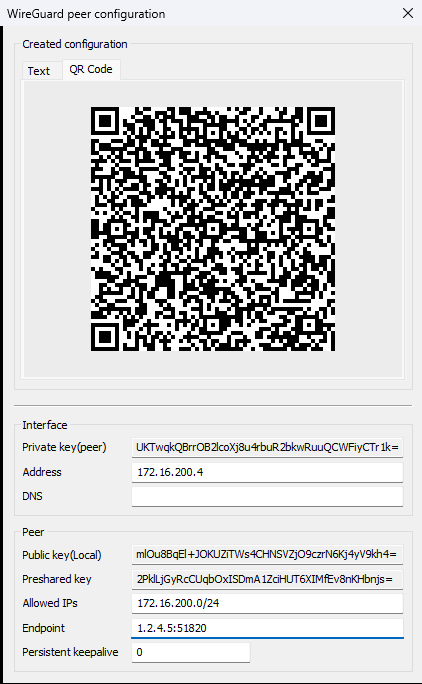
Within the WireGuard configuration page, LANconfig can generate minimal configuration profiles for remote WireGuard clients in the WireGuard configuration format, either as plain text or as a QR code. This configuration can be imported into compatible WireGuard clients via copy & paste or scanned directly from a mobile app using the QR code.
This function works similarly to a wizard, but with the advantage that the generated configuration can be recalled and displayed again at any time.
However, for this to work, the router or LANconfig must store the private key of the remote side — something that is typically undesirable when WireGuard peers belong to different administrative domains. Normally, each communication partner generates its own private/public key pair and shares only the public key with the remote side. The private key remains secret and is only known to the respective partner. This function is ideally suited for administrators who want to generate configurations for devices under their own control.
The parameters DNS and Pre-Shared Key are optional. All other parameters must be entered in order to generate a minimal configuration.
The parameters Address, Allowed IPs, and Endpoint are not stored by LANconfig and must be re-entered when the configuration is reopened.
To access this function in LANconfig for the respective WireGuard connection, go to .
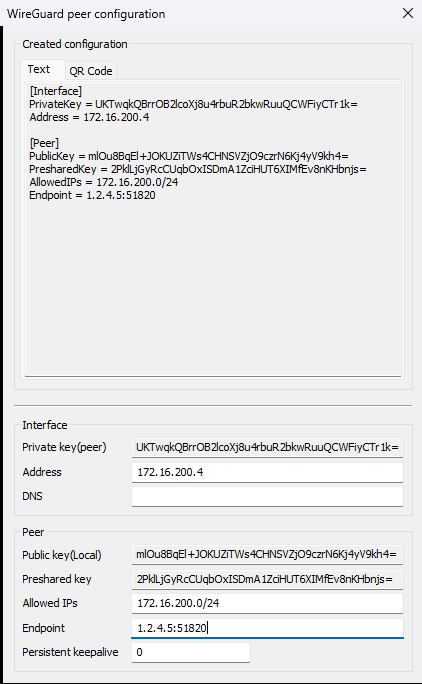
Supported configuration parameters for the remote side:
Interface
- Private key (peer)
- Defines the client’s private key.
- Addresses
- Local IP address of the WireGuard interface on the client side.
- DNS
- DNS server that the client should use for name resolution (optional).
Peer
From the perspective of the remote client, the LCOS device acts as the peer.
- Public key (local)
- Public key of the LCOS device.
- Preshared key
- Optional additional key used alongside the public/private key pair for the connection. The key must be configured identically on both communication partners.
- Allowed IPs
- IP addresses that the client should route into or allow through the WireGuard tunnel. The local networks of the router that the client should access must be specified here.
- Endpoint
- Public IP address including port in the format <IP address>:<Port> of the LCOS device to which the client should establish the connection.
- Persistent Keepalive
- Defines the time in seconds in which the remote device (peer) should send WireGuard keepalive packets. A value of 0 disables the sending of keepalive packets. The "Persistent Keepalive" function in WireGuard ensures that the connection remains active even when no data is being transmitted. By regularly sending keepalive packets, the connection is kept alive across intermediate NAT gateways, for example, and this helps prevent unintentional connection drops.
QR Code
Using the displayed QR code, you can import the configuration into a WireGuard app. Open the WireGuard app and add a new peer via QR code. Additional parameters can then be modified or added if necessary.