Client isolation prevents WLAN clients from communicating with one another or with unauthorized destinations on the network.
Data traffic from WLAN clients to destinations that are not explicitly whitelisted is prohibited.
Client isolation can be switched on per SSID. Configure this under .Then configure the allowed destinations under .
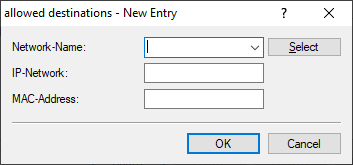
- Network name
-
Select the network / SSID that the entry should apply for. Then enter either a destination IP address or destination
MAC address.
Note: In hotspot scenarios, the MAC address of the gateway should be entered here to ensure Internet access. It is not sufficient to specify its IP address because in this scenario the destination IP address is that of a destination on the Internet.Note: The feature automatically determines the appropriate gateway address from a DHCP negotiation between a WLAN client and a DHCP server. However, in roaming scenarios there is usually no renewed DHCP negotiation during roaming, so in this case the gateway must be explicitly whitelisted.
- IP network
- Allowed destination IP address for this network.
- MAC address
- Allowed destination MAC address for this network.