Under , define the radio settings for client management.
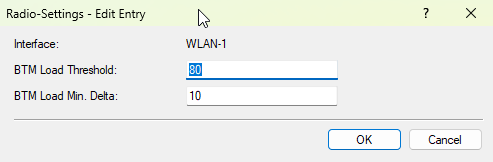
- Interface
- The WLAN interface to which the following settings apply.
- BTM Load Threshold
- When the load on this WLAN interface of the AP exceeds the threshold, the AP sends BTM requests to associated clients to steer them to other APs.
- BTM Load Min. Delta
- This is a dynamic threshold: it is relative to the load of the AP itself. The value configured here specifies the minimum load difference compared to our own load: only neighboring APs whose load is at least BTM Load Min. Delta lower than our own load are recommended to clients. All others are marked as "do not use". Example: BTM Load Threshold is 80, and BTM Load Min. Delta is 10. Assume that our own load is 85—we have exceeded the threshold and attempt to move clients to neighboring APs using BTM requests. However, with a minimum delta of 10, only APs whose load is at least 10 points lower than our own are recommended to clients. In this example, all neighboring APs with a load of 75 or higher are therefore marked as "do not use". (Note: The static threshold from the profile table continues to apply independently.) This "minimum delta" is used to create hysteresis and prevent two neighboring APs with a high load—each close to its own threshold—from continuously moving clients back and forth between them.
