The firewall can be used to filter traffic to and from WLAN networks at the IP level. A deny-all strategy (all traffic is blocked except for configured exceptions) or an allow-all strategy (all traffic is allowed, and only exceptions are blocked) can be used. In addition to IP addresses, hostnames / DNS names can also be used as destinations. To do this, the firewall monitors all DNS requests from clients in the affected WLAN and stores the resolved IP addresses in an internal cache until the TTL (time-to-live) expires. If a client subsequently attempts to establish a connection to an IP address identified in this way, the connection can be blocked or allowed, depending on the configuration.
It is not possible to block DoH completely by design. If preventing all uncontrolled traffic is the priority, it is therefore recommended to configure a deny-all strategy and explicitly allow permitted services.
When a client roams between APs, the client's applications normally do not issue new DNS requests in response. This usually occurs only after the TTL (time-to-live) expires. The firewall of the AP to which the client has roamed therefore cannot analyze DNS requests or learn the resolved IP addresses and, as a result, cannot actually block the client's traffic. To enable this nevertheless, the firewall's DNS cache is transferred and kept synchronized via IAPP between APs configured with the same SSID or SSIDs. This causes all associated APs in the network to generate the same effective firewall rule set and filter traffic based on the IP addresses that any AP in the network has identified from the client's DNS requests. The current DNS cache can be viewed on the AP using the CLI command ls /Status/DNS/Snooping-Results.
The settings for the IP- and DNS-based firewall are available under .
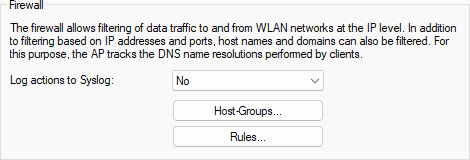
- Log Actions to Syslog
-
When a firewall rule is processed, an entry is created in Syslog.
Important: Depending on the amount of traffic, this may require significant CPU resources and generate a large number of Syslog messages.
