Activating packet capture from the command line

Proceed as follows to capture data packets from the command line:

  1. Start a CLI session on the router from which packets are to be captured.
  2. Change to the path /Setup/Packet-Capture.
  3. Activate the RPCap interface with the command set RPCap-Operating yes.
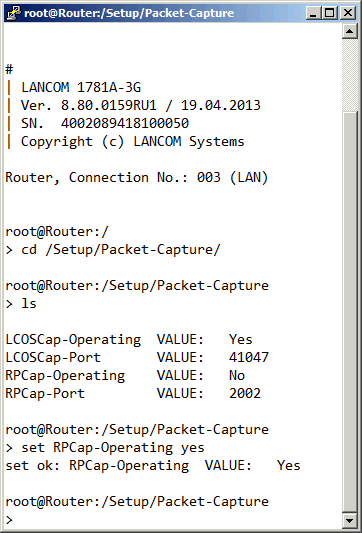


The data packets on the selected interface are now captured. Deactivate packet capture with the command set RPCap-Operating no.

www.rohde-schwarz.com/networks-and-cybersecurity

Rohde & Schwarz Networks and Cybersecurity GmbH | Adenauerstr. 20/B2 | 52146 Wuerselen | Germany | E‑Mail info.rs-nc@rohde-schwarz.com

Rohde & Schwarz Logo