To configure access to the Stanley AeroScout RTLS server with LANconfig, open the view and configure the section Stanley (AeroScout).
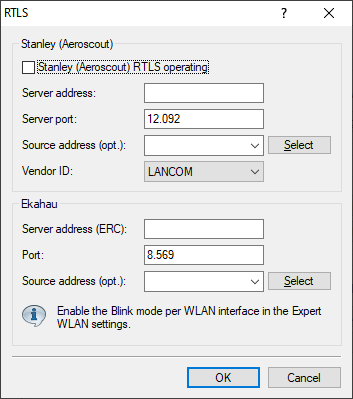
- Stanley (AeroScout) RTLS operating
- Enable this option to activate the forwarding to the
AeroScout Location Engine.
Important: This feature is always activated for all WLAN modules of an access point.
- Server address
- Configure the IP address of the AeroScout Location Engine here.
- Server port
- Configure the server port of the AeroScout Location Engine if the default value is not being used.
- Source address (optional)
- Optionally, configure the source network for the connection to the AeroScout Location Engine. This is only necessary if multiple ARF networks are configured.
- Vendor ID
- Here you configure the vendor ID that the access point reports to the AeroScout Location Engine. If your version of the AeroScout Location Engine does not yet support the dedicated R&S®LANCOM vendor ID, you can switch to the vendor ID "Motorola".
