You can open IPv6 log tables in WEBconfig with .
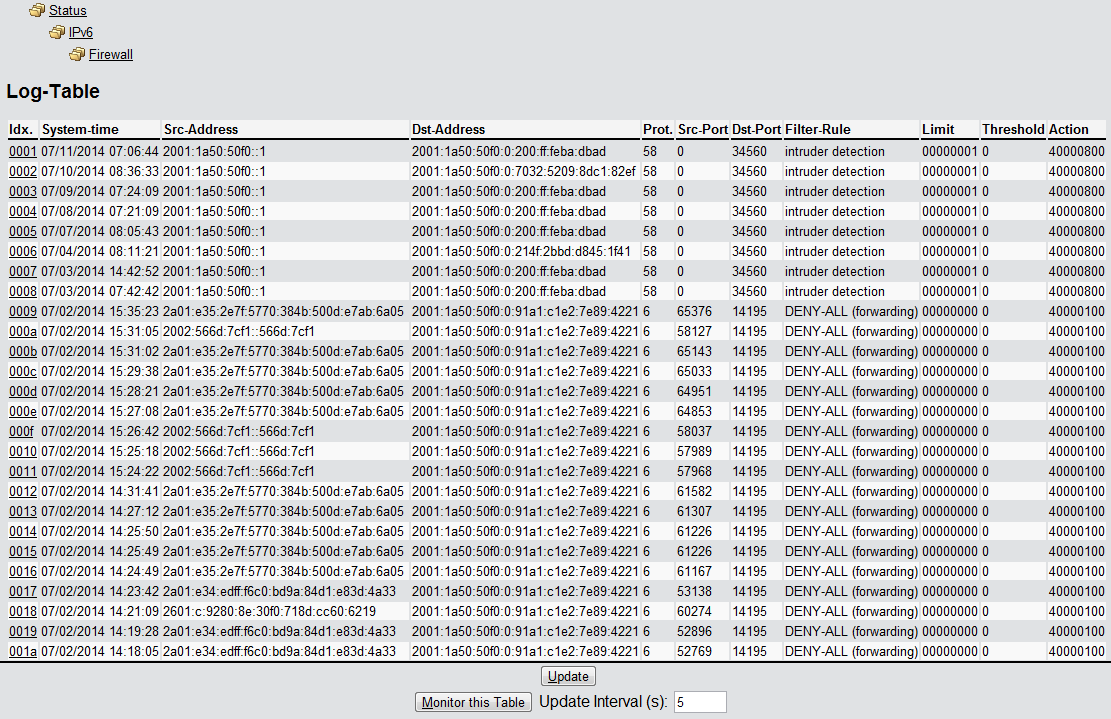
The items have the following meanings:
- Idx.: Sequential index. Furthermore, the table can also be checked via SNMP.
- System time: System time in UTC encoding (converted to cleartext for display).
- Source address: Source address of the filtered packet.
- Destination address: Destination address of the filtered packet.
- Prot.: Protocol (TCP, UDP, etc.) of the filtered packet.
- Source port: Source port of the filtered packet (only for port related protocols).
- Dst port: Destination port of the filtered packet (only for port related protocols).
- Filter rule: Name of the rule that created the entry. If filtering is based on several rules, these rules are listed in the column. If there is too little space, the abbreviation '...' is displayed.
- Limit: Bit field that contains the description of the limit that caused the firewall to apply the filter. There following values are currently defined:
- 0x01: Absolute number
- 0x02: Number per second
- 0x04: Number per minute
- 0x08: Number per hour:
- 0X10: Global limit
- 0x20: Byte limit (if not set, it is a packet limit)
- 0x40: Limit only applies in the inbound direction
- 0x80: Limit only applies in the outbound direction
- Threshold:Threshold limit value of the triggering limit.
- Action: Bit field which lists all the actions performed. There following values are currently defined:
- 0x00000001: Accept
- 0x00000100: Reject
- 0x00000200: Establish filter
- 0x00000400: Internet (default router) filter
- 0x00000800: Drop
- 0x00001000: Disconnect
- 0x00004000: Block source address
- 0x00020000: Lock destination address and port
- 0x20000000: Send SYSLOG notification
- 0x40000000: Send SNMP trap
- 0x80000000: Send e‑mail
Note: All firewall actions also appear in the IP router trace .
