Pairing existing devices via LANconfig

  1. In the first step, you need to generate an activation code in the R&S®LANCOM Management Cloud.
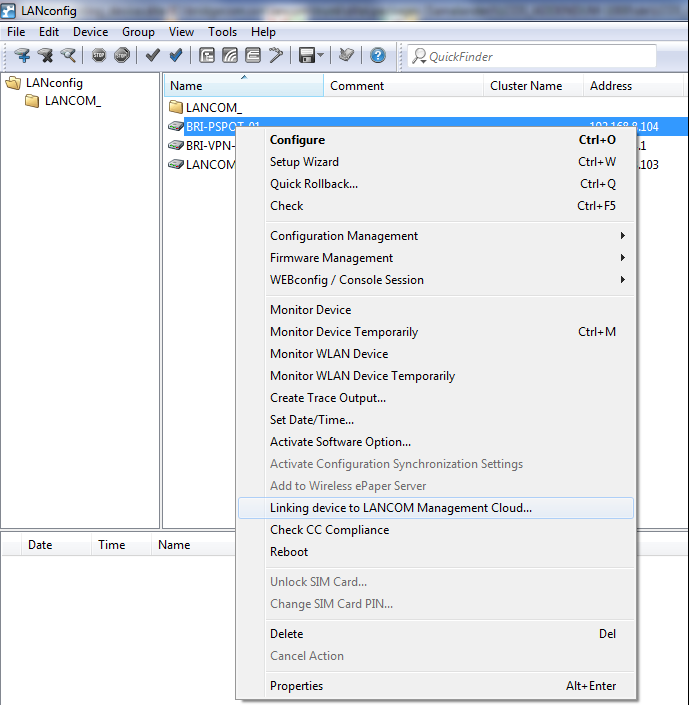
  2. Click on the corresponding R&S®NC device with the right-hand mouse button.
  3. In the context menu, select the entry Link device to the R&S®LANCOM Management Cloud.
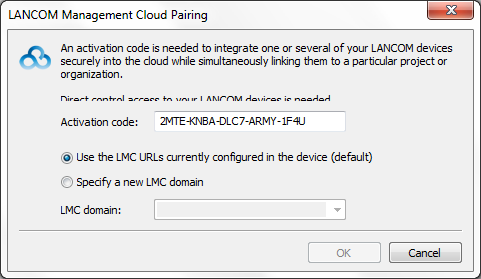
  4. Follow the Wizard's instructions to enter the activation code.
    Three options are available:
    • Public Cloud (default): You use the R&S®LANCOM Management Cloud.
    • Private Cloud: You use your own Cloud.
    • Use the settings currently stored in the device: A public or private cloud is used depending on the existing configuration in the device.
www.rohde-schwarz.com/networks-and-cybersecurity

Rohde & Schwarz Networks and Cybersecurity GmbH | Adenauerstr. 20/B2 | 52146 Wuerselen | Germany | E‑Mail info.rs-nc@rohde-schwarz.com

Rohde & Schwarz Logo