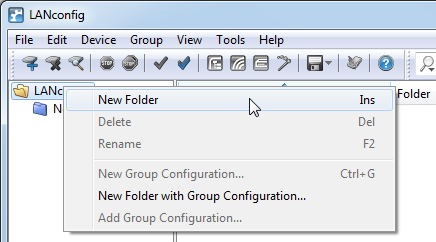
LANconfig uses a directory structure for a clear overview when managing multiple devices. You can create a separate folder for each project or each customer and organize the corresponding devices here:
- Create a new folder by clicking on the parent directory with the right mouse key and selecting New Folder from the context menu. Alternatively you can also click in the application menu.
- Just 'drag and drop' with the mouse to move the individual devices from the list and into the corresponding folder. Devices can also be moved from one folder to another in this way.
Note: The arrangement of devices in folders effects only the display of the devices within LANconfig. The organization of the folders has no influence on the configuration of the devices.
Note: The directory structure in the left margin of the window can be switched on and off with the function key F6 or by using the menu .
