To shield the DMZ (demilitarized zone) and the Intranet from unauthorized attacks, you can activate an additional address check for each interface using the firewall's Intrusion Detection System (IDS).
The relevant buttons are called 'DMZ check' or 'Intranet check' and can have the values 'loose' or 'strict':
- If the button is set to 'loose', then every source address is accepted if the device is addressed directly.
- If the switch is set to 'strict', then a return route has to be explicitly available so that no IDS alert is triggered. This is usually the case if the data packet contains a sender address to which the relevant interface can also route data. Sender addresses from other networks to which the interface cannot route, or sender addresses from its own address range therefore lead to an IDS alert.
Note: For all devices, the default is 'loose'.
You will find the button for activating the DMZ and Intranet address check in LANconfig:
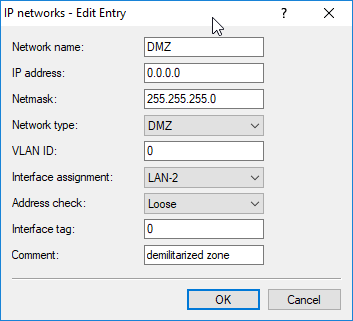
LANconfig:
Console:
