A minimum bandwidth for a specific application is defined in LANconfig by means of a firewall rule according to the following conditions:
- The rule does not need an action, because QoS rules always implicitly assume "transfer" to be the action.
- The guaranteed bandwidth is set on the tab QoS.
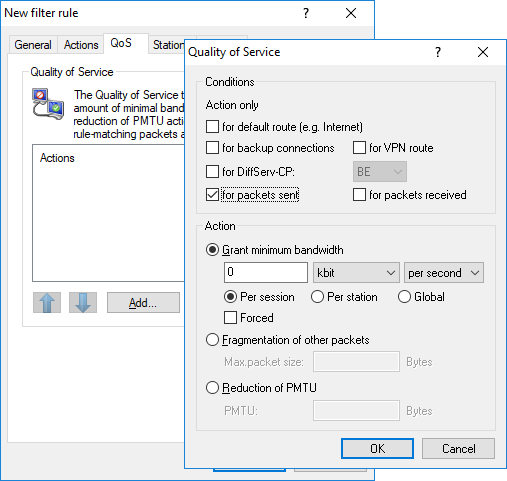
- The option Action only for default route restricts the rule to packets that are sent or received over the default route.
- The option Action only for VPN routes restricts the rule to packets sent or received over a VPN tunnel.
- The option Forced defines a static reservation of bandwidth. Bandwidth reserved in this way cannot be used for any other connections, even while the preferred connection is inactive.
- The option Per connection or Globally specifies whether the minimum bandwidth set here applies to every single connection that complies with this rule (per connection), or if it is the upper limit for the sum of all connections together (globally).
- The tabs Stations and Services are used, as with the other firewall rules, to decide which stations in the LAN/WAN and which protocols this rule applies to.
When configuring from the command line, the minimum and maximum bandwidths in a new firewall rule are entered here:
A required minimum bandwidth is initiated in the rules by the identifier ““%Q”. The implicit assumption here is that the rule involves an "Accept" action, so the packets will thus be transmitted.
For a maximum bandwidth, a simple limit rule is defined that uses a "Drop" action to discard all packets that go beyond the set bandwidth.
Examples:
- %Qcds32: Minimum bandwidth of 32 kbps for each connection
- %Lgds256 %d: Maximum bandwidth of 256 kbps for all connections (globally)
