The 802.1X Authenticator for Ethernet ports supports RADIUS Change of Authorization (CoA) and Disconnect Messages (DM) for 802.1X, as well as for authentication based on MAC addresses.
The shared configuration for Dynamic Authorization is used. In LANconfig under and on the CLI under . This configuration is also used by Public Spot or IKEv2.
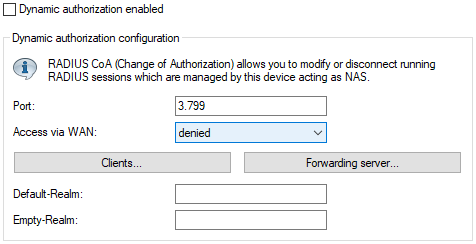
The following CoA functions are supported:
- Disconnecting the session of a current user (Disconnect Message)
- Changing the current user session by modifying the VLAN via a CoA message
Examples:
- The currently active sessions can be displayed via the status
menu:
root@test-8021x-dm:/ > ls /Status/LAN/IEEE802.1x/Authenticator-Ifc-Status/ Ifc Operating Mode State MAC-Auth.-Bypass MAC-Address VLAN-ID Auth-Count Conflicting-MAC ===============------------------------------------------------------------------------------------------- ETH-2 Yes Single-Host authenticated No e89c255b7b86 0 1 000000000000 Conflict-Age ----------------- 0 - The status for CoA can be displayed with the show command "show
ethernet-dynauth":
> show ethernet-dynauth
MAC address e8:9c:25:5b:7b:86 on ETH-2: NAS-Identifier 'test-8021x-dm', User-Name 'test'
- A user session can be disconnected using the CLI command "Radclient" under in the LCOS, for example:
do Radclient 192.168.1.112 disconnect 12345678 "NAS-Identifier=test-8021x-dm;User-Name=test;"
Where:- "192.168.1.112" is the IP address of the NAS, i.e., the router
- "disconnect" is the disconnect message to be sent
- "12345678" is the configured Dyn-Auth/CoA password
- "NAS-Identifier" is the name of the router or the unique identifier of the NAS
- "User-Name" is the 802.1X username used by the client during authentication
- The VLAN of an active session for a MAC-authenticated user can be changed as follows:
do Radclient 192.168.1.112 coa 12345678 "NAS-Identifier=test-8021x-dm;User-Name=e89c255b7b86;
   Tunnel-Type:0=VLAN;Tunnel-Medium-Type:0=IEEE-802;Tunnel-Private-Group-Id:0=200;
Where:- "192.168.1.112" is the IP address of the NAS, i.e., the router
- "coa" is the CoA message to be sent
- "12345678" is the configured Dyn-Auth/CoA password
- "NAS-Identifier" is the name of the router or the unique identifier of the NAS
- "Tunnel-Type:0=VLAN;Tunnel-Medium-Type:0=IEEE-802;Tunnel-Private-Group-Id:0=200" are the required RADIUS attributes to move the client into VLAN 200