-
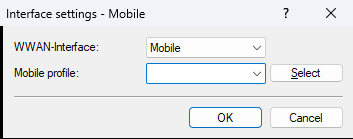
Open the configuration in LANconfig under . Set Mobile Profile
to "empty".
-
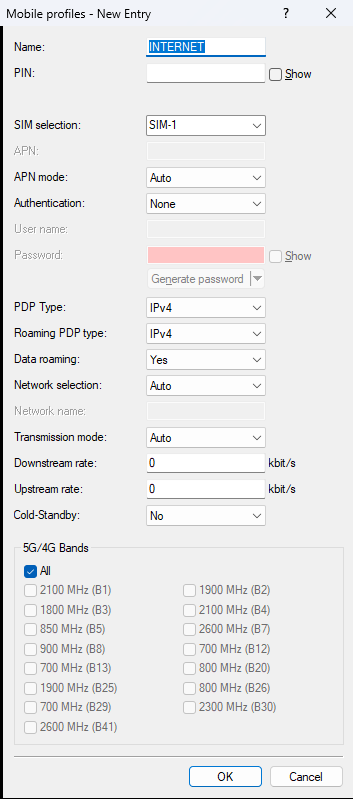
Open the configuration under . Configure the required settings for your mobile provider here.
-
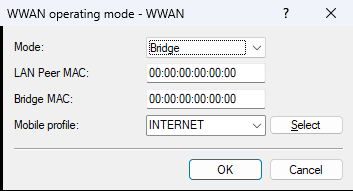
Open the configuration under . Set the Mode
to "Bridge", set LAN Peer
MAC
and Bridge MAC
to "00:00:00:00:00:00", and select
the Mobile Profile
created in step 2.
-
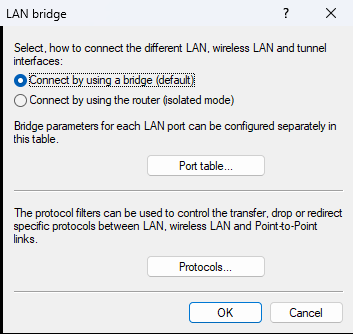
Enable the LAN bridge under .
-
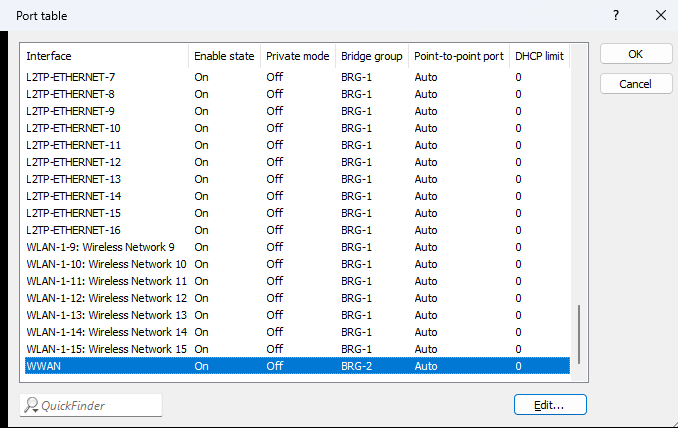
Open the Port Table
. To forward traffic from the mobile modem
to an Ethernet port, the WWAN interface and a corresponding LAN interface must be configured together in a
common bridge group. In this example, LAN-2 and WWAN are configured in bridge group BRG-2. Use a different
bridge group if BRG-2 is already in use for WLAN or other functions.
-
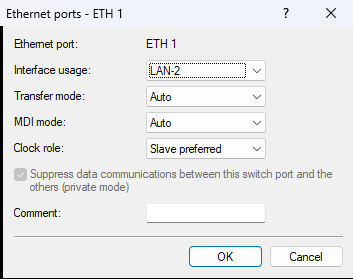
Open . Configure one Ethernet port to use the LAN interface that belongs to the
shared bridge group with the WWAN interface. In this example, LAN-2 is bound to Ethernet port ETH-1, which is
grouped together with WWAN in bridge group BRG-2.
Note: Please observe the following:- No route or WWAN peer configuration is required for a WWAN device in bridge mode, because the device does not operate as a router and only requires a bridge configuration. It is recommended to delete any existing WWAN peer configurations (including the default WWAN zero-touch peer) to avoid configuration issues and unnecessary error messages caused by failed peer connection attempts.
- The router cannot reach the Internet itself via the mobile modem when operating in bridge mode.
- Ensure that only a single endpoint device is connected to the Ethernet port used for bridge mode, because only one device can obtain an IP address from the mobile network. The LAN Peer MAC address configuration ensures that only one fixed MAC address receives the IP address.
- No internal or external DHCP server may be active in the WWAN bridge group.