If the LANCOM Router device is operating as a client, the tab 'Client mode' can be used for further settings that affect the behavior as a client.
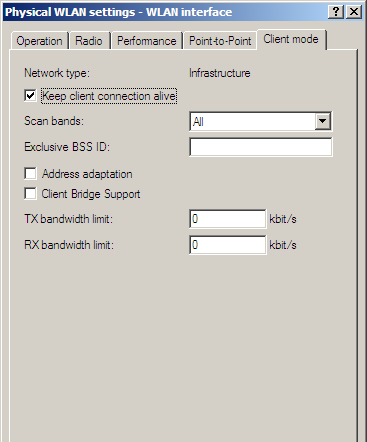
LANconfig: Wireless LAN / General / Physical WLAN settings / Client mode
WEBconfig: LCOS menu tree / Setup / Interfaces / WLAN / Client modes
- Keep client connection alive This option ensures that the client station keeps the connection to the access point alive even if the connected devices are not exchanging any data packets. If this option is disabled, the client station is automatically logged off the wireless network if no packets are transferred over the WLAN connection within a specified time.
- Scan bands This defines whether the client station scans just the 2.4 GHz, just the 5 GHz, or all of the available bands for access points.
- Preferred BSS ID If the client station is to log onto one particular access point only, the MAC address of the WLAN module in this access point can be entered here.
- Address adaptation In client mode, the client station normally replaces the MAC
addresses in data packets from the devices connected to it with its own MAC address. The
access point at the other end of the connection only ever “sees” the MAC address of the
client station, not the MAC address of the computer(s) connected to it.
In some installations it may be desirable for the MAC address of a computer to be transmitted to the access point and not the MAC address of the client station. The option ‘Address adaptation’ prevents the MAC address from being replaced by the client station. Data packets are transferred with their original MAC addresses—in the WLAN, the Access Point takes the client's MAC address.
Note: Address adaptation only works when just one computer is connected to the client station. - Client-bridge support Whereas address adaptation allows only the MAC address of a
single attached device to be visible to the access point, client-bridge support
provides transparency in that all MAC addresses of the LAN stations behind the client
stations are transferred to the access point.
Furthermore, the three MAC addresses usual in client mode are not used for this operating mode (in this example for server, access point and client station), but rather four addresses as with point-to-point connections (the fourth is the MAC address of the station in the LAN of the client station). The fully transparent connection of a LAN to the client station allows targeted transmission of data packets in the WLAN and hence functions such as TFTP downloads, initiated by a broadcast. The client-bridge mode offers the following advantages:
- Unlike the "normal" client mode, address translation (masking) in the client station is omitted.
- In relation to point-to-point connections, the occasionally undesirable entry of MAC addresses or station names is omitted. Furthermore, the client-bridge mode allows more than six connections (limitation with P2P) to be set up.
- The client station can roam, which is not possible with point-to-point (this applies both to the client-bridge mode and to the standard client mode).
Note: Client-bridge mode can only be used between two LANCOM devices. Likewise, the use of the client-bridge mode must be enabled in the settings for the logical network of the access point.