You can test an HTTP connection in this table. The E2E test accesses the configured HTTP-Target-URL and compares the received HTTP status code with the value specified in the Expected Response field.
The HTTP test can also be used as a speed test if a sufficiently large file can be downloaded from the HTTP target URL. To enable a meaningful throughput measurement, Max-Size-Bytes should also be configured in this case. If no maximum value is specified, the entire file is downloaded.
The measured throughput is always displayed in the test results. However, this value is meaningful only if a sufficiently large file is downloaded and the TCP/HTTP download can reach a realistic transfer speed.
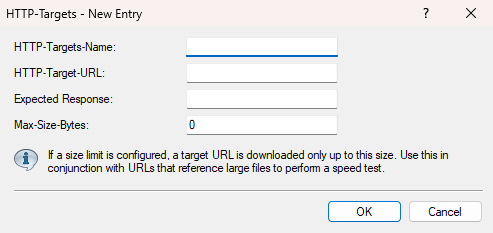
- HTTP-Targets-Name
- Enter a name for this HTTP target.
- HTTP-Target-URL
- Enter the URL to be tested.
- Expected Response
- Enter the expected response.
- Max-Size-Bytes
- Optional size limit.
