If the network being tested is protected by a captive portal, you can configure the required login parameters here.
The E2E test first accesses the configured test URL to check whether the captive portal redirects the request. If a redirect is detected, the test creates an HTTP POST request with the entries from the Captive Portal Login Data table and sends it to the URL specified in the Form Action field.
The test URL is then accessed again. If no redirect occurs, the login is considered successful and the test passes.
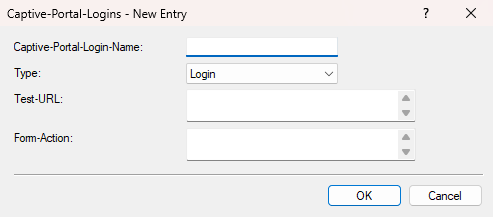
- Captive-Portal-Login-Name
- Enter a name for this captive portal login.
- Type
- You can select either "Login" or "Logout" here. Depending on the captive portal, it may be useful to log the user out again after the test is completed. This can, for example, conserve resources on the captive portal gateway or allow the same credentials to be used for subsequent test runs. To do this, create an additional entry with the type "Logout". Configure the Form Action so that it performs the logout action of the captive portal. The logout URL may differ from the URL of the login form. Analyze the HTML code of the respective portal for this purpose. However, many modern captive portals with click-through login do not provide a logout function. In this case, the user session is terminated only after a timeout. A captive portal test that runs regularly at short intervals may then succeed without actually checking the login, because the MAC address of the testing access point is still cached in the captive portal. If you manage the captive portal yourself, a special test function may be useful. For example, a hidden form in the HTML code could start a dedicated test session that automatically expires after a short time.
- Test-URL
- This is the URL that the E2E test accesses to determine whether the captive portal redirects the request. It can point to any URL that reliably responds with an HTTP status code in the "200" range. Ideally, use a URL that responds with "200" or "204". This field is empty by default because no URL from an external third party can be specified as a fixed default. Therefore, you must configure a suitable URL.
- Form-Action
-
This is the URL to which the login credentials are transmitted via HTTP POST. For a classic LCOS Public Spot, this could be a URL such as the following:
https://pspot.lancom.de:443/authen/login/
If this field remains empty, the E2E test automatically uses the URL to which the captive portal redirected the request when the Success URL was accessed for the first time. For R&S®LANCOM Management Cloud-based hotspots, this usually enables login without additional configuration of this URL.
