The WLAN E2E test supports both PSK authentication and IEEE 802.1X authentication with the usual client-side options.
To use IEEE 802.1X, you must first configure a suitable supplicant profile.
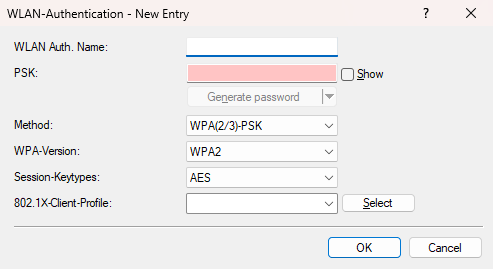
- WLAN-Auth.-Name
- Enter a name for this WLAN authentication configuration.
- PSK
- Enter the PSK.
- Method
- Select the WLAN authentication method.
- WPA-Version
- Select the WPA version.
- Session-Keytypes
- Select the session key type.
- 802.1X-Client-Profile
- Select an IEEE 802.1X client profile.
