Configure authentication, authorization, and accounting (AAA) here using the TACACS+ protocol.
If this feature is active, admin logins are checked against the TACACS+ server and displayed and changed configuration items are transferred to the TACACS+ server for approval and/or logging.
Note: The configuration points are transferred in OID representation.
Important: When TACACS+ operation is active, the WEBconfig of the device is switched off.
The TACACS+ settings of the device can be found under .
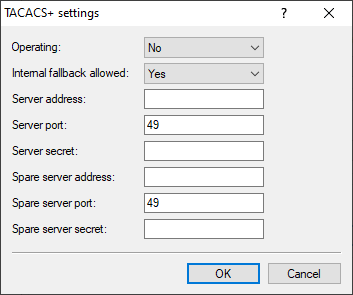
- Operating
- Switches the use of TACACS+ on or off.
- Internal fallback allowed
- If this option is activated, a login with local user data can be carried out if the TACACS+ server is not available.
- Server address
- The IP address of the primary TACACS+ server.
- Server port
- The port of the primary TACACS+ server.
- Server secret
- The key used for communication with the primary TACACS+ server.
- Spare server address
- The IP address of the backup TACACS+ server.
- Spare server port
- The port of the backup TACACS+ server.
- Spare server secret
- The key used for communication with the backup TACACS+ server.