Use Spanning Tree to configure the Spanning Tree Protocol.
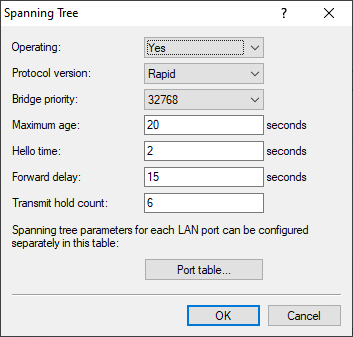
- Operating
- When Spanning Tree is disabled, a device does not send Spanning Tree packets and forwards any received Spanning Tree packets instead of processing them itself.
- Protocol version
-
- Classic
- Uses the classic STP procedures for determining network topology.
- Rapid
- Uses the RSTP procedures for determining network topology.
- Note: RSTP is compatible with STP. If components in the network only support classic STP, STP procedures will be used even when RSTP is enabled.
- Bridge priority
-
Sets the priority of the bridge in the LAN. This can influence which bridge is preferred as the root bridge by the Spanning Tree Protocol.
Note: For compatibility with RSTP, this value should only be changed in increments of 4096, as RSTP uses the lower 12 bits of this 16-bit value for other purposes.
- Maximum age
-
This value determines the time (in seconds) after which a bridge discards messages received via Spanning Tree as "stale". This parameter defines how quickly the Spanning Tree algorithm responds to changes, e.g., due to bridge failures.
Note: Modifying this time value is recommended only with a thorough understanding of the Spanning Tree Protocol. Adjustments may be useful to optimize response times to topology changes or to ensure stable operation in networks with many "bridge hops".
- Hello time
-
This parameter (in seconds) specifies the intervals at which a device selected as the root bridge sends Spanning Tree information to the LAN.
Note: Modifying this time value is recommended only with a thorough understanding of the Spanning Tree Protocol. Adjustments may be useful to optimize response times to topology changes or to ensure stable operation in networks with many "bridge hops".
- Forward delay
-
This time (in seconds) specifies the minimum time that must pass before a Spanning Tree port is allowed to change state (Listening, Learning, Forwarding).
Note: When using RSTP, the forwarding delay often has no effect, as RSTP has built-in mechanisms to trigger a fast transition to the forwarding state.Note: Modifying this time value is recommended only with a thorough understanding of the Spanning Tree Protocol. Adjustments may be useful to optimize response times to topology changes or to ensure stable operation in networks with many "bridge hops".
- Transmit hold count
-
Number of BPDUs that can be sent with RSTP before a one-second pause is enforced.
Note: When using classic STP, the transmit delay has no effect.
- Port table
-
The following values can be configured separately in the port table for all available ports (LAN, Wireless LAN, point-to-point links).
- Priority
-
Sets the priority of the port. If there are multiple possible network paths with the same path cost, the priority determines which port is used. If the priorities are equal, the port that appears higher in the list is selected.
Note: For compatibility with RSTP, this value should only be changed in increments of 16, as RSTP uses only the upper 4 bits of this 16-bit value.
- Edge-Port
-
Marks the port as an edge port, to which no additional bridge is connected, only end devices like workstations or servers. Edge ports immediately switch to the forwarding state.
Note: Edge ports are still monitored by RSTP. If BPDUs are detected on such a port, the port loses its status as an edge port.
- Path-Cost-Override
- This parameter controls the priority of equivalent paths. The value set here is used in place of the calculated path cost for selection. The default value of 0 disables path cost override.