Not every configuration task requires an administrator with full permissions. As a root administrator, you can create administrators with restricted permissions. This means that the main device password does not have to be known to every administrator. Additional administrators are configured under .
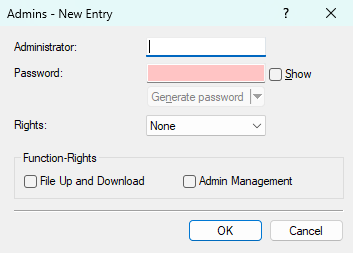
- Administrator
- The name of the new administrator account.
- Password
- The password of the new administrator account.
- Rights
-
Select one of the following access rights:
- None: The configuration cannot be read or written, but a CLI login for executing commands is possible.
- Admin-RO: The configuration can be read but not written.
- Admin-RW: The configuration can be read and written.
- Function-Rights
-
Select from the following function rights:
- File Up and Download: This function right is required to transfer files, for example via SCP, such as the support information file.
- Admin Management: This function right is required to configure additional administrators on the device.
