As of LCOS FX 11.2, the following changes to the SAML settings have been introduced for both the internal and external portal. New options are now available for using the certificate truststore, selecting an optional IdP certificate (formerly "IdP Certificate (PEM)"), and specifying a base group ID.
In earlier versions, a certificate in PEM format had to be copied or imported into a text field. This procedure has been changed. The desired certificate must now first be imported into the certificate management. The imported certificate can then be selected via IdP Certificate. Alternatively, the new option Use Certificate Truststore can be enabled. In this case, the server certificate is validated against the system certificate truststore, and no separate certificate needs to be specified.
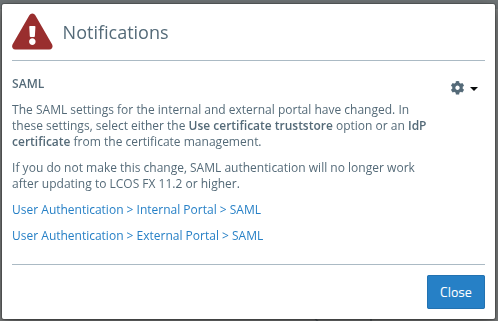
After updating to LCOS FX 11.2, a certificate previously stored in PEM format is automatically imported into the certificate management and selected, provided the text field contained exactly one certificate. If the PEM data contained multiple certificates, automatic selection is not possible, as only a single certificate can be specified now. Following an update, a message will appear prompting you to complete the configuration (see below).
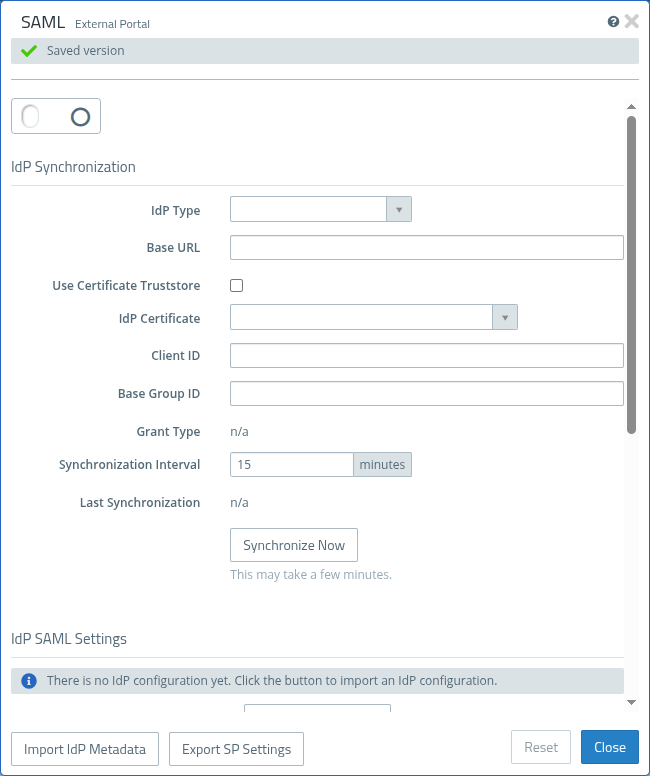
| Input field | Description |
|---|---|
| Use Certificate Truststore | Instead of specifying a certificate under IdP Certificate, this option can be enabled. In this case, the verification of the server certificate is performed against the system certificate truststore. No certificate needs to be specified. |
| IdP Certificate | Optional. If the connection between the firewall and the IdP uses a certificate that the firewall does not trust, it can be selected here so that a secure connection can be established. This is useful, for example, for self-signed certificates. The certificate must be imported into the certificate management beforehand. Alternatively, instead of specifying a certificate, the option Use Certificate Truststore can be enabled. In this case, the verification of the server certificate is performed against the system certificate truststore. No certificate needs to be specified. |
| Base Group ID | Optional. Specify this ID to synchronize only a specific group (and its subgroups). This option can be used to reduce the scope of the IdP synchronization. It is particularly useful when a large number of groups exist and synchronization takes a long time. |
Notifications
A new notification is displayed in the client after upgrades or when restoring a backup if
- the SAML settings are enabled,
- no IdP certificate has been selected,
- and the option Use Certificate Truststore is not enabled.
These last two conditions may occur in particular after upgrading to LCOS FX 11.2 or when restoring older backups.